Home › Booking › Appointure
Booking plugin for WordPress

Appointure

Appointment booking for WordPress. Customers pick a service, a staff member and a time, pay a deposit through Stripe, and get reminders by email, SMS or WhatsApp.

Version
1.0.0 Changelog
Updated
7 October 2026
Licence
1, 2, 3 or unlimited sites per key

Read the setup guide

What it does

Appointure is an appointment booking plugin for WordPress. Visitors pick a service, a date and a time in a three-step booking widget, see times in their own timezone and get a confirmation with a calendar file. You set each service's length, buffers and price, give each staff member their own hours, take full payment or a deposit through Stripe, and send reminders by email, SMS or WhatsApp. Bookings sync both ways with Google Calendar and can get a Zoom or Google Meet link.

Booking in three steps

Customers pick a date, then a time shown in their own timezone, enter their details and get a confirmation with an Add to calendar link. The booking widget works as a shortcode or a block, and a services grid sends each Book Now button to it with the service chosen.

Your own questions on the form

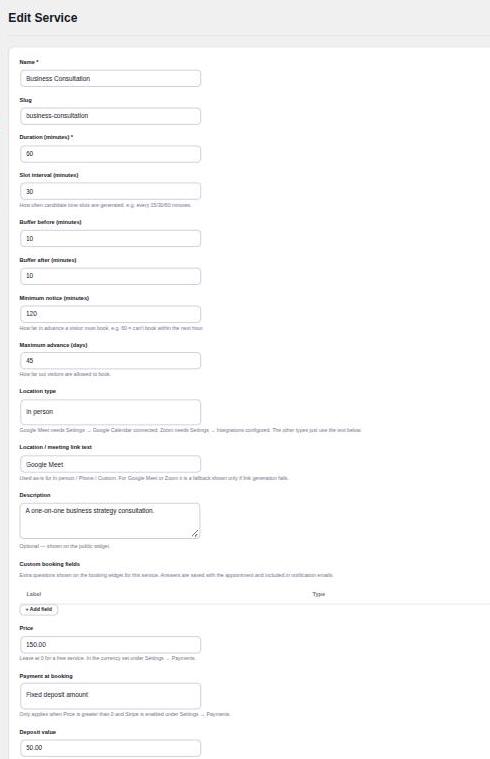
Add custom fields to any service, such as a company name or what the customer wants to discuss. Answers are saved with the appointment and included in the notification emails. Customers can apply a discount code on the same step.

Rules for each service

Set the length, how often start times are offered, buffers before and after, minimum notice and how far ahead people can book. The location can be in person, phone, Google Meet, Zoom or your own text.

Deposits and payment through Stripe

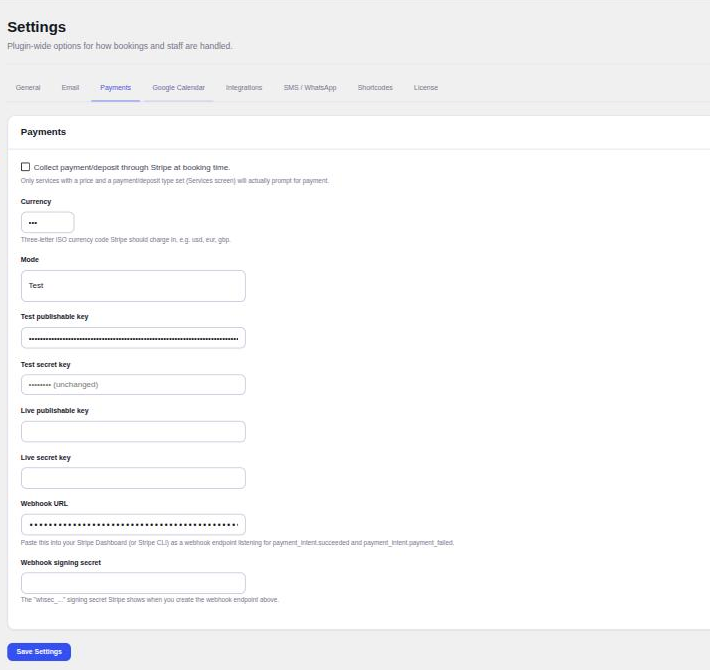
Charge the full price, a fixed deposit or a percentage at booking time. A paid booking stays pending until Stripe confirms it, and an unpaid one is cancelled automatically so it doesn't hold the slot. Refund in full or in part from the Appointments screen.

Reminders by email, SMS or WhatsApp

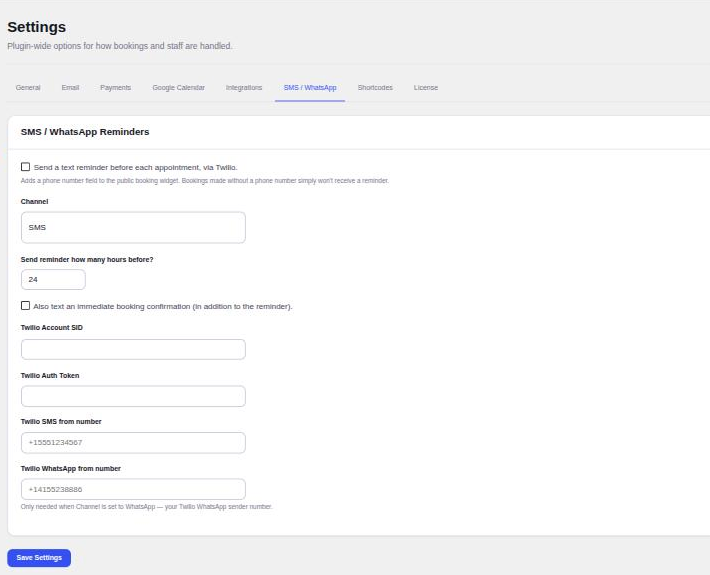
Send a reminder email a set number of hours before each confirmed appointment, and a text through your own Twilio account by SMS or WhatsApp. Every email and text is logged, so you can see what went out.

Zoom and Google Meet links

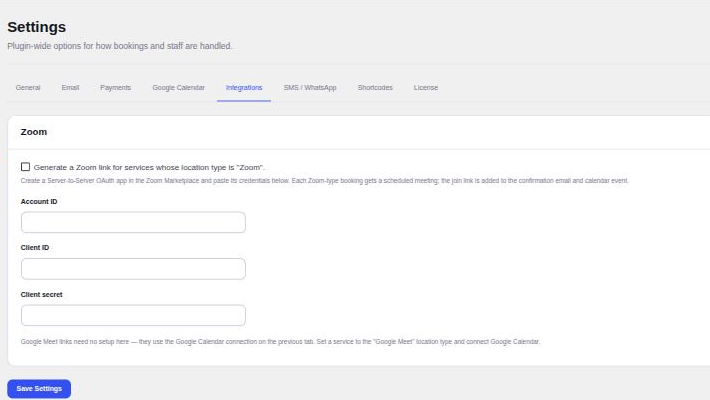
A service set to Zoom gets its own scheduled meeting for every booking, and Google Meet links come from the Google Calendar connection. The join link goes into the confirmation email and the calendar event.

A My Bookings screen for customers

Logged-in customers see their upcoming and past appointments in one place, including ones booked before they registered, and can join the meeting, reschedule, cancel or add a booking to their calendar. Rescheduling and cancelling follow the switches in your settings.

The problem

Booking by email takes four messages to agree one time. The customer asks when you’re free, you offer three slots, one has gone by the time they reply, and nobody has paid anything, so a forgotten appointment costs you the hour. Hosted booking services fix that, but they charge every month and keep your customers on someone else’s site.

How a booking works

  1. The customer opens your booking page, or clicks Book Now on a services grid, and picks a date. Days with free times are highlighted.
  2. They pick a time. Slots are shown in their own timezone, worked out from the hours you set in your site’s timezone.
  3. They enter their name, email and any questions you added for that service, plus a discount code if they have one.
  4. If the service takes payment, they pay the full price or a deposit through Stripe. The booking stays pending until Stripe confirms it.
  5. They get a confirmation screen and email with an Add to calendar file, and later a reminder by email, SMS or WhatsApp if you turn reminders on.

Services, staff and hours

Each service has its own length, how often start times are offered, buffers before and after, minimum notice and how far ahead people can book. A 60-minute consultation can start every 30 minutes with 10 minutes kept free on either side.

With multi-provider mode on, each staff member gets their own weekly hours and the services they take. When a service has two or more staff, customers can choose a person or leave it on Any available staff, and Appointure books whoever is free at that time with the fewest upcoming bookings. Date overrides close a day for a holiday or open one for a Saturday session without touching the weekly hours.

Running the diary

Every booking lands in the Appointments screen, as a filterable list and as a month calendar coloured by service. From the list you confirm, cancel, mark completed or no-show, and refund a paid booking in full or in part. Phone bookings go in through Add Appointment, which can override your hours when you need it to.

Customers can reschedule or cancel from a link in their emails if you allow it, so changes don’t have to come through you. Customers with an account on your site also get a My Bookings screen listing their upcoming and past appointments, with buttons to join the meeting, reschedule, cancel or add the booking to their calendar. Bookings made before they registered show up too, matched by email.

Calendars, meetings and reminders

Connect one Google account and confirmed bookings appear on its calendar, while events already on it block those times for new bookings. Services set to Google Meet get a Meet link from the same connection. Services set to Zoom get their own scheduled Zoom meeting. Reminder texts go through your own Twilio account, by SMS or WhatsApp.

Multisite

Appointure runs on WordPress multisite with separate data for each subsite. One licence covers the network: each subsite running the plugin counts as one site against the licence, and activations follow automatically as subsites are added, switched on or off, or deleted. Only a network admin can activate or deactivate the licence.

For developers

A REST API under appointure/v1 serves services, availability and slots, takes bookings, validates coupons, reschedules and cancels a booking by its reference and returns calendar files. 29 documented actions and filters cover the booking lifecycle, the slot engine, emails, texts, payments and templates, and the front-end templates can be overridden from your theme.

What it doesn’t do

  • There are no recurring appointments, group classes or multiple locations in this version.
  • Online payment is Stripe only. Services can also be set to pay in person.
  • Calendar sync is with Google Calendar, and one Google account is connected per site, not one per staff member.
  • Texts need a Twilio account, which you pay Twilio for directly.

Requirements and compatibility

Your site needs

Also needs
Only for the features that use them: a Stripe account for payments, Google Cloud OAuth for Calendar and Meet, a Zoom app for Zoom links, Twilio for texts
WordPress
6.0 or newer
PHP
8.0 or newer
Multisite
Supported. One network licence, and each subsite running the plugin counts as one site

This release

Version
1.0.0
Updated
7 October 2026
Changelog

Version 1.0.0

* Initial release.

It keeps its data in its own database tables and never changes your other plugins' files.

Full comparison: WordPress appointment booking plugins compared

Who it's for, and who it isn't

Buy this if

You take appointments for yourself or a small team, want customers to book and pay a deposit on your own site, and would rather pay once a year than every month for a booking service.

Don't buy this if

You need recurring appointments, group classes, several locations, PayPal, or a separate Google Calendar for each staff member. None of those are in this version.

Frequently asked questions

Does it need WooCommerce or another plugin?

No. Appointure runs on WordPress alone. Stripe, Google, Zoom and Twilio accounts are only needed for the features that use them.

Can two customers book the same time?

No. The slot is checked again on the server when the booking is saved, inside a database transaction, and the database refuses a second booking for the same service, staff member and start time.

Can customers reschedule or cancel themselves?

Yes, if you allow it. Add a page with the [appointure_manage_booking] shortcode and select it in the settings. Confirmation and reminder emails then link to it, and you can allow rescheduling and cancelling separately.

How is a staff member chosen when the customer doesn't pick one?

When a service has two or more staff, the widget offers Any available staff. Appointure books the person who is free at that time and has the fewest upcoming bookings.

Does each staff member get their own Google Calendar?

Not in this version. One Google account is connected per site. Events on its calendar block those times, and confirmed bookings are added to it.

Which payment methods does it take?

Card payments through Stripe, for the full price or a deposit, in the currency you set. Services can also be set to take no payment online, so customers pay in person.

Which timezone are times shown in?

You set working hours in your site's timezone. Visitors see slot times in their own timezone, customer emails use the customer's timezone and admin emails use the site's.

What happens to my data if I delete it?

Deactivating keeps everything. Deleting the plugin from the Plugins screen removes its tables and settings, including the Google Calendar connection, so export anything you need first.

Can customers see all their bookings?

Yes, if they have an account on your site. The My Bookings screen lists their upcoming appointments, soonest first, and their past ones, with buttons to join the meeting, reschedule, cancel or add a booking to their calendar. Bookings they made before registering appear too, matched by email.

Does it work on WordPress multisite?

Yes. Each subsite keeps its own services, staff and bookings. One licence covers the network, each subsite running Appointure counts as one site against it, and only a network admin can activate or deactivate it.

Can I charge for Zoom or Google Meet appointments?

Yes. Set a price and a payment option on the service (full payment, a fixed deposit or a percentage deposit), then set its location to Zoom or Google Meet. The customer pays through Stripe, and once Stripe confirms the payment they receive the confirmation email with their meeting link. Zoom needs a Server-to-Server OAuth app, and Google Meet needs the Google Calendar connection. Bookings that are not paid within 20 minutes are cancelled so the slot is freed.

What does the licence include?

One licence key for 1, 2, 3 or unlimited sites, whichever you pick at checkout, valid for a year. Every licence has every feature, plus all updates and support for that year. If you don't renew, the plugin keeps working but stops receiving updates.

Is there a refund policy?

Yes. Email support@pluginsprout.com within 14 days of buying, from the address you bought with, and we refund the full amount.

Appointure $79 a year, one site