Filter by status and date
Pick Failed, Pending payment, On hold or Draft (abandoned checkout), and a date range or a quick range such as Last 7 days. Orders from the last hour are skipped by default.
Clear the failed and pending orders a card-testing attack leaves behind, in the background, trash first, with a report on who sent them.
Failed & Spam Order Cleaner clears the failed, pending, on-hold and abandoned-checkout orders that card-testing and spam attacks leave in WooCommerce. You pick the statuses and dates, preview what matches, and it moves the orders to the trash in background batches, however many there are. Every cleanup ends with an attack report: how many orders, over what time span, from how many distinct emails, IP addresses and countries, exportable as CSV. Paid orders are left alone by default, as are subscription orders, and a whole cleanup can be restored in one click.
Pick Failed, Pending payment, On hold or Draft (abandoned checkout), and a date range or a quick range such as Last 7 days. Orders from the last hour are skipped by default.
See how many orders match, by status, and the newest ones with their email, IP address and total. Click any order to check it before you clean up.
Orders go to WooCommerce’s trash so a mistake can be undone. Deleting permanently takes a ticked box and typing DELETE, checked again on the server.
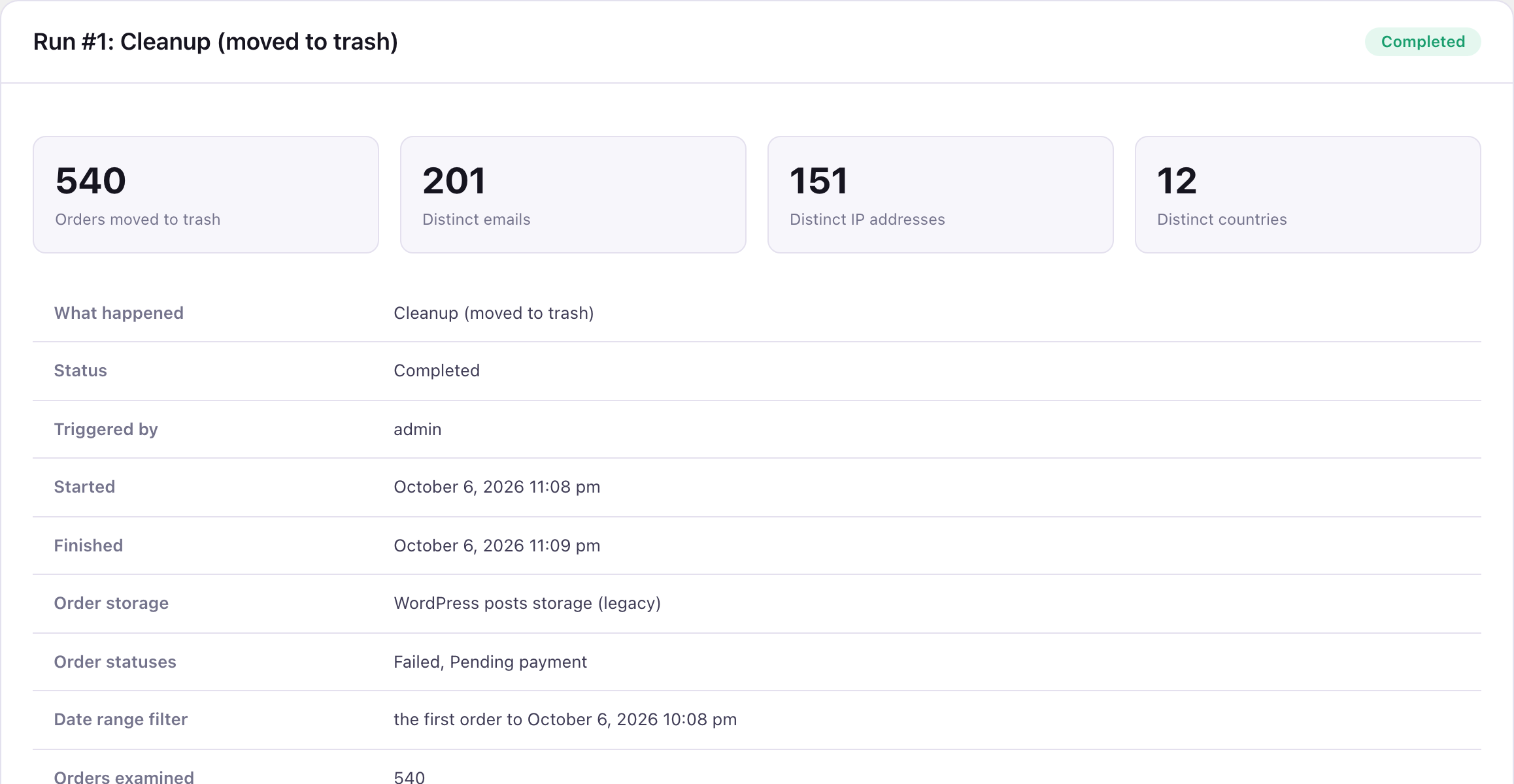
Orders handled, the time span they were placed in, and the distinct emails, IP addresses and countries behind them. A report can also be run without changing any order.
The emails, IP addresses and countries that placed the most orders, and a CSV export with every one of them and its order count.
Restore every order from a cleanup in one click, in the status it had. Large restores run in the background too.
A card-testing attack can leave thousands of failed orders in a single night. Bots run stolen card numbers through your checkout, most are declined, and every attempt leaves a failed or pending order behind. WooCommerce’s Orders screen bulk-edits one page of orders at a time, so clearing tens of thousands means hundreds of rounds of select all, move to trash and wait. Until they’re gone, they bury your real orders.
Orders with a recorded payment date are skipped by default, even if they match, because they took real money once. The protection is a checkbox on the Settings tab, called Never touch orders that have a recorded payment, and it stays on unless you switch it off. So are orders linked to a WooCommerce Subscriptions subscription, orders from the last hour (a customer may still be paying) and anything placed after the cleanup started. On our test store we seeded 541 failed and pending orders, one of which had been paid. The preview counted 540.
Every cleanup moves orders to WooCommerce’s trash unless you choose otherwise. Deleting permanently takes a ticked box and typing DELETE, and the server checks both again. Once you’ve checked the report and the trash, you can delete the trashed orders for good from the same screen.
* Initial release.
It runs alongside WooCommerce and never changes its files, so you can keep updating WooCommerce as usual.
Setup guides: Failed & Spam Order Cleaner user guide
| WooCommerce Orders screen | Failed & Spam Order Cleaner | |
|---|---|---|
| Clear orders in bulk | One page at a time | Every matching order, in the background |
| Count of matching orders before acting | No | Yes |
| Skips orders that were once paid | No | Yes, by default |
| Restore a whole cleanup in one click | No | Yes |
| Report on the attack (emails, IPs, countries) | No | Yes, with CSV export |
Full comparison: WooCommerce failed and pending order cleanup tools compared
Your store was hit by card testing or checkout spam, and the Orders screen is full of failed and pending orders you need gone without clicking through them a page at a time.
You want to stop attacks as they happen. This cleans up afterwards; blocking, CAPTCHA and fraud scoring need an anti-fraud tool.
No. It cleans up the orders an attack leaves behind and reports on it. It has no CAPTCHA, rate limiting, fraud scoring or automatic blocking, so use an anti-fraud or bot-blocking tool to stop the attack itself.
It only looks at the statuses you tick, and it skips orders with a recorded payment (a setting that is on by default), orders linked to a WooCommerce Subscriptions subscription and, by default, orders from the last hour. The preview lists the newest matches so you can check them first, and the default is the trash, so a whole cleanup can be restored.
There is no fixed limit. It works through orders in background batches that stop after a few seconds each, so it doesn’t time out. Our 540-order test cleanup took about a minute; larger cleanups take longer depending on your hosting.
Yes. It works with High-Performance Order Storage and with the older posts storage, and shows which one your store uses.
No. It removes orders from your store only. Data already sent to a payment gateway, shipping service or email tool stays there and is managed in that service.
Yes, if the orders went to the trash. Each report has a button that restores every order from that cleanup. Orders deleted permanently can’t be restored.
How many orders were handled, the time span they were placed in, and the distinct emails, IP addresses and countries behind them, with the number of orders each one placed. It can be exported as a CSV. The per-email and per-IP lists are kept for 90 days by default, and the summary stays in the Activity Log.
Yes. Choose Generate report only and it produces the same attack report without changing any order.
One licence key for 1, 5 or unlimited sites, whichever you pick at checkout, valid for a year. Every licence has every feature, plus all updates and support for that year. If you don’t renew, the plugin keeps working but stops receiving updates.
Yes. Email support@pluginsprout.com within 14 days of buying, from the address you bought with, and we refund the full amount.


