
Each learner gets their own expiry date
Set a validity period once per certificate, and every student’s certificate expires that long after they complete the course. You can also grant, extend or revoke one student’s certification by hand.
Make each student's LearnDash certificate expire a set time after they finish, with reminder emails and paid renewal. For first aid, safety and CPD training.
LearnDash Certificate Expiry gives every student's certificate its own expiry date, counted from the day they finished the course. It emails them before it lapses, can charge for the certificate through WooCommerce, and gives each certificate a public page where an employer can check it is still valid.
Set a validity period once per certificate, and every student’s certificate expires that long after they complete the course. You can also grant, extend or revoke one student’s certification by hand.
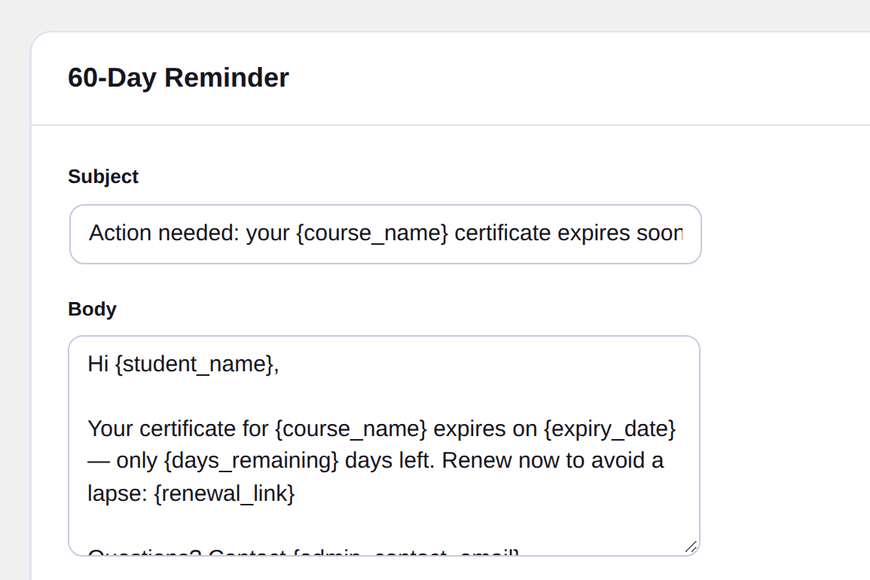
Reminder emails go out 180, 90 and 60 days before expiry, plus an expired notice. You can edit every subject and body, and each email includes a renewal link.
Gate a certificate behind a WooCommerce product. The certificate is released automatically when the order reaches the status you choose, or you can keep offline payments for manual approval.
Every certificate gets a unique, non-guessable link and QR code. An employer can open it to see who holds the certificate, which course it is for, and whether it is still active.
Students can share a verified certificate to LinkedIn, Facebook or X in one click, and certificates can be exported as Open Badges v2.0.
LearnDash certificates don’t expire. Once a student finishes a course, the certificate is valid forever. That’s fine for a hobby course. It’s a real problem for anything that has to be renewed: first aid, food hygiene, safety inductions, CPD.
Most training sites we looked at handle it with a spreadsheet. Export the completions, add a year, set calendar reminders, email people one by one. It works until someone leaves, a date slips, or an auditor asks whose certificate is still valid right now.
Install the plugin and activate your licence first. Installing an add-on and activating your licence has the steps.
Only need verification? CertiSprout, our free plugin on wordpress.org, proves a certificate is real and adds no expiry dates. Certificate Expiry does not need it: it has its own verify and QR shortcodes, [learndash_certificate_expiry_verify] and [learndash_certificate_expiry_qr_code].
Per course, you decide when the certificate is granted: straight away for free (the default), only after payment, or only after an admin approves it.
For paid certificates you link a WooCommerce product to the certificate. The certificate is released when the order reaches the status you choose (Completed by default), and you decide whether offline methods such as bank transfer, cheque or cash on delivery count.
Everything sits on one screen under LearnDash LMS → Certificate Expiry: every student, course, status, expiry date and payment reference. You can filter it, approve or revoke in bulk, grant, extend or revoke one student by hand, and export a CSV for compliance reporting. Admins get a weekly digest email, and an activity log records every grant, renewal, expiry and revocation.
Add the certificate status shortcode or block to a page and students see their own certificates, with a renewal link, so they don’t have to email you to find out where they stand.
See all LearnDash certificate plugins.
1.2.1
* The license server address and product are now fixed in the plugin and can no longer be changed from wp-config.php.
1.2.0
* Updates are now delivered automatically from pluginsprout.com (the license server URL was fixed).
* Multisite: one license covers the network, each subsite counts as one site, and only a network admin can change it.
* Add-ons can add their own settings tab (used by Learndash Certificate Renewal's license tab).
1.0.0
* Initial release: certificate expiration, renewal reminders, WooCommerce-gated re-certification, public verification with QR codes, Open Badges export, activity log, and admin digest.
* License key activation for automatic updates. Every feature works without a license; the key only enables updates.
It runs alongside LearnDash and never changes its files, so you can keep updating LearnDash as usual.
Setup guides: Setting up LearnDash Certificate Expiry
| LearnDash on its own | With Certificate Expiry | |
|---|---|---|
| Certificate expiry | Never expires | Per student, counted from their completion date |
| Renewal reminders | None | 180, 90 and 60 days before, plus an expired notice (editable) |
| Charge for the certificate on its own | No | Yes, via a WooCommerce product |
| Admin approval before issue | No | Yes, per course |
| Public page to check a certificate | No | Unique link and QR code |
| Open Badges export | No | Open Badges v2.0 |
| Compliance list | Build it yourself | Filterable list with CSV export |
Full comparison: Certificate expiry for LearnDash: the options compared
You run compliance or safety training, and your learners enrol year-round and need to recertify.
Your learners move as a cohort with one shared end date.
No. LearnDash certificates never expire on their own, so you need an add-on for this.
No. You only need WooCommerce to charge for a certificate or its renewal. Without it, an admin can approve and renew certificates by hand.
Its status changes to expired, the verification page shows it as expired, and the student gets the expired notice. If you ticked "Also remove the student from this course when the certificate expires", their course access is removed as well.
Yes. Each course has a reminder schedule in days before expiry, for example "180,90,60" or "30,7". You can also rewrite every email on the Email templates tab.
Yes. The verification link and QR code open a public page with the holder's name, the course and the current status. Each link is unique and can't be guessed.
They aren't picked up automatically. Grant their certifications from the Certifications screen, where you can also set or extend each expiry date by hand.
Yes. The verification page has share buttons for LinkedIn, Facebook and X, and certificates can be exported as Open Badges v2.0.
Yes. Set the course to grant the certificate only after payment, and choose a WooCommerce product on the certificate. The student finishes the course, the certificate waits as pending, and it is released when the order reaches the status you choose (Completed by default). The student needs an account when they buy, and the certificate validity starts when it is released.
One licence key for 1, 3, 5 or unlimited sites, whichever you pick at checkout, valid for a year. Every licence has every feature, plus all updates and support for that year. If you don't renew, the plugin keeps working but stops receiving updates.
Yes. Email support@pluginsprout.com within 14 days of buying, from the address you bought with, and we refund the full amount.
 Bundle for LearnDash
 Add-on for LearnDash


